🌍 WORLDWIDE SHIPPING
Fast & Secure Delivery
Reliable, discreet shipping with tracking to over 80 countries.
🇺🇸 🇨🇦
USA & Canada
24–72 Hours
(1–3 Business Days)
🇪🇺
Europe
2–5 Business Days
🇦🇺 🌍
Australia & Worldwide
2–5 Business Days
🚚 Tracked Shipping • 📦 Discreet Packaging • 🔒 Secure Delivery • 💬 24/7 Support
1
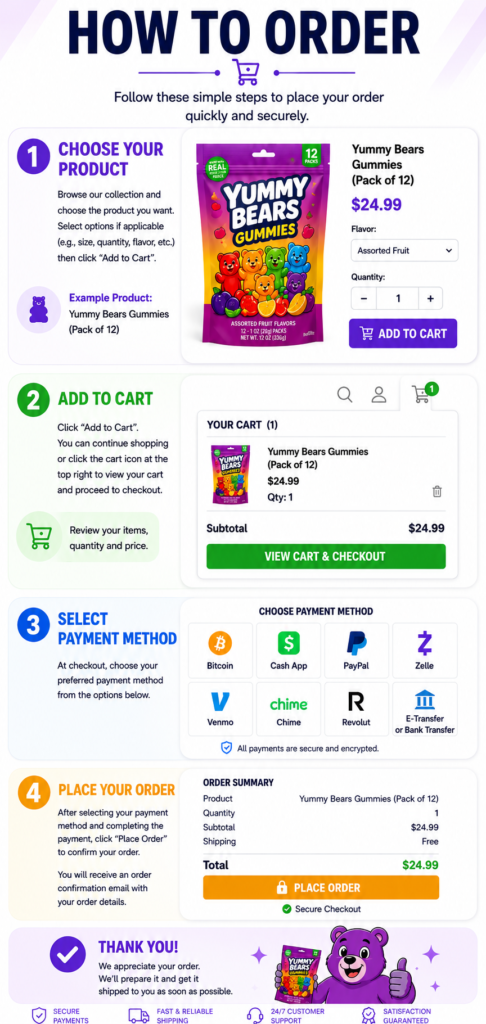
Choose Your Product
Browse through our product collection and click on any item you’d like to purchase.
If the product has different options such as size, flavor, color, or quantity, choose the option that best suits your needs.
Helpful Tip
Select your preferred options and quantity, then click Add To Cart to continue to the next step.
What You Can Do
- ✔ View product images
- ✔ Choose available options
- ✔ Select quantity
- ✔ Check the price
- ✔ Click Add To Cart
🛒 ADD TO CART
2
Review Your Shopping Cart
After clicking Add to Cart, your selected product will automatically be added to your shopping cart.
Click the Shopping Cart icon at the top of the website to review your order before continuing.
Review Before Checkout
Confirm your product, quantity and total before proceeding.
Things To Check
- ✔ Correct product
- ✔ Correct quantity
- ✔ Correct price
- ✔ Product options are correct
3
Apply Coupon & Checkout
If you’re a new customer, you can apply our welcome coupon before checkout.
Welcome Coupon
BONUS10
New clients only. Get 10% OFF on orders above $200.
Click Proceed to Checkout once your cart is ready.
Helpful Tip
If you don’t have a coupon, simply continue to checkout.
Next Step
- ✔ Review your cart
- ✔ Apply BONUS10 (optional)
- ✔ Verify your order total
- ✔ Click Proceed to Checkout
PROCEED TO CHECKOUT →
4
Checkout
Once you click Proceed to Checkout, you’ll be asked to enter your delivery information.
Please make sure all your information is correct before placing your order.
Information Required
- ✔ Full Name
- ✔ Email Address
- ✔ Phone Number
- ✔ Shipping Address
- ✔ City
- ✔ State / Province
- ✔ ZIP / Postal Code
- ✔ Country
Helpful Tip
Double-check your phone number and shipping address before continuing. This helps ensure order updates and delivery information reach you correctly.
Checkout Page
Complete all required fields, then continue to the payment section.
5
Review & Place Order
Before placing your order, take a moment to review all the information on the checkout page.
Make sure everything is correct, including:
- ✔ Products
- ✔ Quantity
- ✔ Shipping Address
- ✔ Contact Information
- ✔ Order Total
Choose your preferred payment method from the options available during checkout.
Once everything has been reviewed, click the Place Order button to submit your order.
Almost Done
Carefully reviewing your order before submitting it helps prevent mistakes.
🎉
Order Submitted Successfully
After placing your order, you should receive an order confirmation by email if one is provided by the store. Keep your order number for future reference.
📦
Order Received
📧
Confirmation Email
🚚
Shipping Updates
Thank You!
Thank you for your order. If you have any questions about your purchase, you can contact the store’s customer support using the contact information provided on the website.
🍄 HOW TO PLACE AN ORDER
🍁 MAGICSHROOMSDELIVERY.CA
1
Browse Products
Explore our premium mushroom collection.
⬇️
2
Add To Cart
Add your selected items to cart.
⬇️
3
Checkout
Enter your shipping information.
⬇️
4
Payment Method
Choose your preferred payment option.
⬇️
5
Complete Order
Review your details and place your order.
⬇️
6
Confirmation
After placing your order, contact us via Email, Text Message, or WhatsApp to confirm your order and receive further assistance.
🍁 CANADA • 🚚 FAST SHIPPING • 🌎 WORLDWIDE DELIVERY • 💬 SUPPORT
Introduction:
Magicshroomsdelivery.ca offers a convenient and secure platform to purchase synthetic psychedelics. Follow this step-by-step guide to ensure a smooth ordering process.
Steps to Order:
1.Visit the Website:
Go to the official Magicmushroomsforsale.ca
website buyshroomsoregon.com to explore available products.
2.Browse Products:
Navigate through the product categories to find the specific synthetic cannabinoids or related items you wish to purchase.
3.Product Information:
Click on the product of interest to access detailed information, including product description, usage guidelines, and pricing.
4.Add to Cart:
Once you’ve decided on a product, click “Add to Cart.” You can continue shopping or proceed to checkout.
5.Review Cart:
Review your selected items in the cart, ensuring quantities and products are accurate.
Checkout:
Click on the “Checkout” button to initiate the order process.
6.Provide Shipping Information:
Enter your accurate shipping details, including name, address, and contact information. Ensure the information is correct to avoid shipping issues.
7.Select Payment Method:
Choose your preferred payment method from the available options ( E-transfer, Zelle, Cash App, Apple Pay, Chime, and crypto currency, etc.).
8.Apply Discounts or Promo Codes:
If applicable, enter any discount codes or promo vouchers during the checkout process to avail of discounts.
9.Review Order:
Carefully review your order, shipping details, and payment information before confirming the purchase.
10.Place Order:
Click the “Place Order” button to finalize your purchase. You may receive an order confirmation email with details of your transaction.
Additional Tips
Security Measures:
Ensure the website is secure (HTTPS) before providing any personal or payment information.
Use a secure and private internet connection when making the purchase.
Customer Support:
If you have any questions or concerns, reach out to
Buy shrooms Oregon customer support for assistance